
Financial Times: Business News
The Financial Times LimitedNews & Magazines
4.62.54K Reviews
- Version
- 2.303.0-snapshot.177.5935763537783.16509+c1a0e8e
- Installs
- 1.00M
- Age Rating
- Everyone
Screenshots


Our Review of Financial Times: Business News
 Analysis by Appyee
I judge a news app not only by what it covers, but by how well it fits the moments when I actually have time to read. Financial Times: Business News is built around business and public affairs, yet its value goes beyond checking a headline: it can help me understand why a company, policy decision, or market shift matters. The trade-off is that a polished reading experience is most useful when I have a reliable connection and enough time to get past the headline.
When a connection changes the reading experience
News is time-sensitive, so a strong connection matters most when I open the app to check a developing story or follow the latest business coverage. A headline may be enough to orient me, but the reporting and analysis are where I get context. If a page is slow to load on a weak network, that can interrupt the very moment I wanted a quick update. I treat it as a place to read and make sense of coverage, rather than assume every item will be equally convenient to access in every network condition.
That distinction is useful when choosing between this and a general news feed. A broad aggregator can be faster for scanning many publishers’ headlines in one place. The Financial Times app makes more sense when I want a focused editorial voice and reporting across business, finance, politics, the arts, and related subjects. I would use both differently: an aggregator for a quick sweep, and this app when I want to spend attention on a particular story.
Fitting reading into the day
On a commute, I might have only a few minutes and a patchy connection. In that situation, I would open the app while service is good, choose a story I genuinely want to finish, and give it time rather than repeatedly switching between headlines. At a desk or at home, I’m more likely to follow a topic across several pieces and compare analysis with the day’s news. The app suits both habits, but it is especially useful when I can return to an article with enough focus to understand its detail.
If you mainly want quick local alerts, sports scores, or a broad mix of light stories, a general-purpose news app may fit better. This is a more deliberate choice for readers who care about business and public affairs. I also wouldn’t recommend it as a substitute for professional investment advice: news and market coverage can inform your understanding, but they don’t decide what is right for your finances.
What to expect from access and subscriptions
The app is free to install, and its developer is The Financial Times Limited. It is rated for Everyone and has a 4.5 average from around 49,000 ratings, with over 1 million installs. In-app purchases range from $2.49 to $719.00 per item, so I would check the subscription or purchase terms shown in the app before committing. A free download should not be mistaken for a promise that every article or service is free to read.
For a new reader, my practical advice is to explore the available access options before building a daily habit around a particular article. If you encounter a payment prompt, pause and read what it covers instead of assuming that closing it will unlock the story. That small check helps avoid surprises and makes it easier to decide whether the depth of coverage is worth the ongoing cost for your own reading routine.
Recovering when a story will not load
When an article stalls, I first check whether other pages or apps can use the connection; that helps separate a network problem from a one-off loading issue. I would then retry on a steadier connection and reopen the story. If the issue is tied to access rather than connectivity, refreshing the page is unlikely to resolve it, so I’d check the account or purchase prompt instead. These simple checks are more useful than repeatedly tapping the same headline.
For travel or a day with unreliable service, I plan around the uncertainty: I read important pieces before leaving dependable Wi-Fi and avoid counting on a story being available at the exact moment I need it. That is a sensible habit for any live news service, and especially for a reader who wants analysis rather than just a glance at a headline. I would not treat the app as a guaranteed backup library unless its current access options clearly support the way I want to read.
Keeping mobile data use intentional
If I’m watching data use, I avoid opening article after article just to sample the headlines, particularly when I’m away from Wi-Fi. I pick the subjects I care about and read with purpose. This also makes the app less noisy as a daily habit: instead of letting a stream of updates dictate my attention, I can check in at a time that suits me and follow the coverage that has real value to me.
Notifications can be helpful when a major development matters to my work or interests, but I prefer to be selective about what earns an interruption. A notification is a prompt to check a story, not a replacement for reading it. If alerts become distracting, I would review the app’s notification controls and keep only the updates I’m likely to act on. That balance keeps breaking news useful without turning every phone check into another news session.
Getting Started with the App
So, diving right in, downloading the Financial Times: Business News app is a breeze. It’s available on both Android and iOS, so no one’s left out. Once you’ve got it on your device, setting up is pretty straightforward. Just a few taps and you’re in, ready to explore the vast world of business news that awaits.
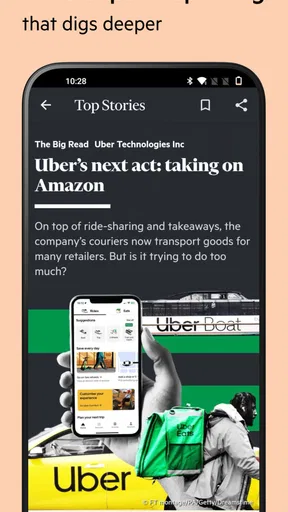
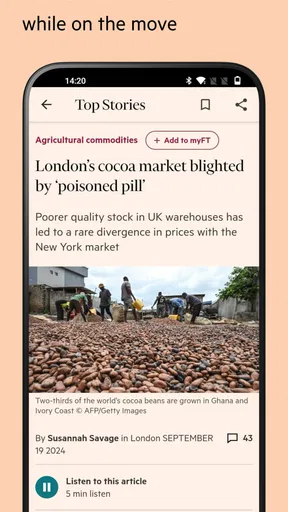
The interface is super sleek with an intuitive design. Seriously, navigating through the app feels like a walk in the park. You’ve got your top stories, market trends, and personalized news feed all laid out in a way that just makes sense. You’ll be scrolling through headlines like a pro in no time.
Features That Stand Out
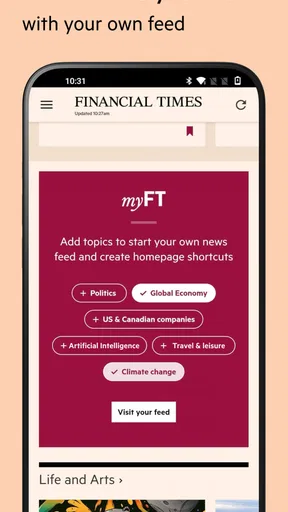
This app isn’t just about reading articles; it’s about staying informed in a way that fits your lifestyle. One of my favorite features is the ability to customize your news feed. You can select topics that matter to you the most, whether it’s finance, politics, or tech. This way, you’re not bombarded with news you’re not interested in.
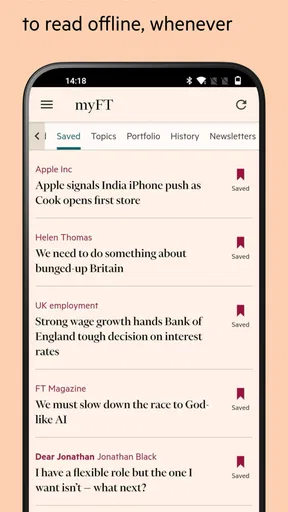
Another cool feature is the app’s offline mode. For those of us who are always on the go, this is a lifesaver. Just download the articles when you’re on Wi-Fi, and you can read them anywhere, anytime, without worrying about data usage. Perfect for those subway rides or when you’re in a spotty service area.
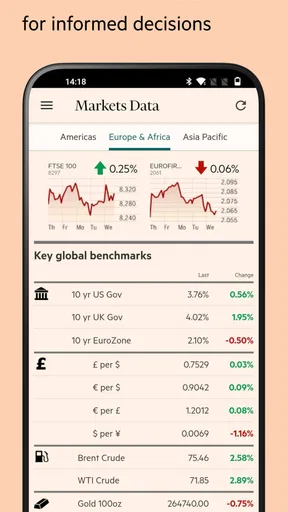
And let's not forget the market data section. Whether you’re a seasoned investor or just someone trying to understand what’s going on with stocks and commodities, this part of the app is invaluable. Real-time updates and detailed insights make it easy to keep track of your investments.
Why I Keep Coming Back
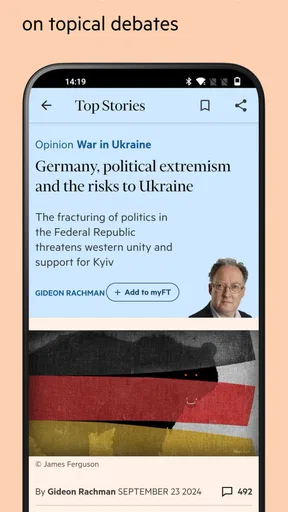
If you’re like me and appreciate a deep dive into business news, you’ll love the in-depth analysis and opinion pieces. The app offers articles written by industry experts who provide insights that go beyond just the headlines. It’s like having a mini-expert panel in your pocket.
And here’s something I didn’t expect to love so much: the notifications. Normally, I’m not a fan of my phone buzzing every five minutes, but the app’s notifications are smart. They alert you to breaking news and important updates without being overwhelming. It’s like having a personal news assistant keeping you in the loop.
Wrapping It Up
All in all, the Financial Times: Business News app is a must-have for anyone serious about staying informed in the business world. It’s comprehensive, easy to use, and packed with features that make keeping up with news not just a task, but a pleasure.
Whether you’re a business professional, a student, or just someone who loves staying on top of world affairs, this app has something for you. So why not give it a go? Download it today and see how it transforms your news consumption experience.
Making the most of a focused news habit
The app is most rewarding for readers who want to connect business coverage with the wider forces around it. A company story may sit beside political or economic developments, and that broader mix can help me avoid treating a market headline as an isolated event. I’d use the topic choices with a little restraint: start with a few subjects that matter, then adjust after noticing which ones genuinely help me understand the day. A feed narrowed too aggressively can make the reading feel tidy while hiding relevant context.
For a student, the useful routine may be different from a professional’s. I’d choose one substantial piece and note the terms or arguments I want to investigate further, rather than trying to absorb every update. For someone working in business, checking the coverage before a meeting can provide a clearer sense of the public discussion around a company or sector. In either case, the benefit is not simply being first to see a headline; it is having a dependable place to return to for reporting with more room for explanation.
A practical routine for busy days
Imagine I have a short break between appointments and want to know why a business story is suddenly being discussed. I can scan the leading coverage, select the relevant subject in my feed, and read one article rather than bouncing among unrelated alerts. Later, when I have a quieter stretch, I can revisit the topic and look for analysis that helps put the initial report in perspective. That split approach is more realistic than expecting to follow every development continuously, and it protects the app from becoming just another source of interruptions.
On a day when I’m moving between Wi-Fi and mobile service, I’d make the decision about what to read while I have a stable connection, then avoid assuming a page will remain available after connectivity changes. The key trade-off is between immediacy and depth: a short check can tell me what has happened, while meaningful analysis asks for time and a working connection. If I need a quick glance with minimal effort, a lightweight headline feed may be more convenient; if I want considered business reporting, this app is the stronger fit.
Choosing it over other news sources
Compared with a newspaper app focused on one city or country, this publication’s business emphasis is more useful to me when a story crosses borders or connects markets with politics and culture. Compared with social feeds, it gives me a more intentional reading destination and less reason to judge importance by how often a story is shared. Those alternatives still have a place: local services are better for neighborhood updates, while social platforms can surface eyewitness discussion quickly. I would use them as supplements, not as interchangeable replacements for careful reporting.
The app is also not the right choice for everyone who wants financial information. A reader looking primarily for a simple portfolio tracker, personalized trading signals, or a beginner’s step-by-step investing course should look for a tool designed specifically for those jobs. Here, I value the reporting and interpretation, while treating market coverage as context rather than a personalized instruction. That distinction matters: a news story can explain a trend, but it cannot account for an individual reader’s goals or tolerance for risk.
Version, compatibility, and a sensible decision
The current Android version is 2.288.0-snapshot.35.1708068546041.13849+5773775, and the listed minimum operating system is Android 8.0. If I’m considering an older phone, I’d check its system version before trying to install the app; if it cannot run the required software, the sensible choice is to read through another supported route rather than spend time troubleshooting an incompatible device. The app has been available since November 8, 2011, but what matters in daily use is whether its current setup fits my phone and reading habits.
My overall recommendation is conditional rather than universal. I’d choose it if I regularly follow business, finance, politics, or the arts and value analysis enough to make room for focused reading. I’d skip it if I mainly want free, rapid-fire headlines, highly local coverage, or a tool that tells me what action to take with my money. Connectivity adds a practical constraint, and purchase prompts deserve a careful look, but for a reader who wants to understand the forces behind business news, it can earn a place in a deliberate daily routine.
Privacy and Permissions
See what permissions an app requests and how it handles your data.
- Identity
- add or remove accounts
- Phone
- read phone status and identity
- Wi-Fi connection information
- view Wi-Fi connections
- Device ID & call information
- read phone status and identity
- Other
- view network connections, create accounts and set passwords, full network access, read sync settings, run at startup, prevent device from sleeping, toggle sync on and off
Verdict
Strengths of Financial Times: Business News
- Comprehensive global news coverage.
- Real-time market data updates.
- Customizable news alerts.
- User-friendly interface design.
- In-depth analysis and reports.
Limitations of Financial Times: Business News
- Subscription required for full access.
- App can be data-intensive.
- Limited offline reading options.
- Occasional ad interruptions.
- High battery usage observed.
Similar Picks in This Category
View All
Google News - Daily Headlines
Google LLC4.0

X
X Corp.4.8

Flipboard:Your Social Magazine
Flipboard3.4

Opera News: breaking & local
Opera4.5

Hindi News by Dainik Bhaskar
Dainik Bhaskar Group4.0

Way2News Daily News App
Way2News ( Formerly Way2SMS )4.6
Frequently Asked Questions
What features does the Financial Times app offer?
The Financial Times app provides a range of features, including real-time news updates, in-depth analysis, and market data. Users can customize their news feed, access exclusive articles, and set up alerts for breaking news. The app also offers offline reading and integration with Google and Apple calendars for event tracking.
Is the Financial Times app free to use?
The Financial Times app can be downloaded for free, but it requires a subscription to access most of its content. There are various subscription plans available, ranging from basic access to premium features. Some articles and features may be available for free, but full access requires a paid plan.
Can I access the Financial Times app offline?
Yes, the Financial Times app allows users to download articles for offline reading. This feature is particularly useful for users who travel frequently or have limited internet access. You can select specific articles or entire sections to read later without an internet connection.
How does the Financial Times app personalize content for users?
The app offers personalized content based on user preferences. By selecting favorite topics and industries, users receive tailored news and analysis. The app also uses algorithms to suggest articles based on reading habits, ensuring a more relevant and engaging experience for each user.
Is the Financial Times app available on both Android and iOS devices?
Yes, the Financial Times app is available for both Android and iOS devices. Users can download it from the Google Play Store for Android or the Apple App Store for iOS. The app is designed to provide a seamless experience across smartphones and tablets, ensuring accessibility for all users.
